
Quick Summary
YouTube Posts — formerly the Community tab — lets brands publish polls, updates, questions, and announcements directly to their subscribers’ home feeds between video uploads. Channels that use it consistently see 23% higher subscriber retention and 31% more video views from returning subscribers compared to channels that only post videos. It’s available to any channel with Advanced Features enabled, with no subscriber threshold required. For brands with an already-loyal audience, it’s one of the most underused engagement tools on the platform — and one of the most straightforward to add to an existing content plan.
What Are YouTube Posts — And What Happened to the Community Tab?
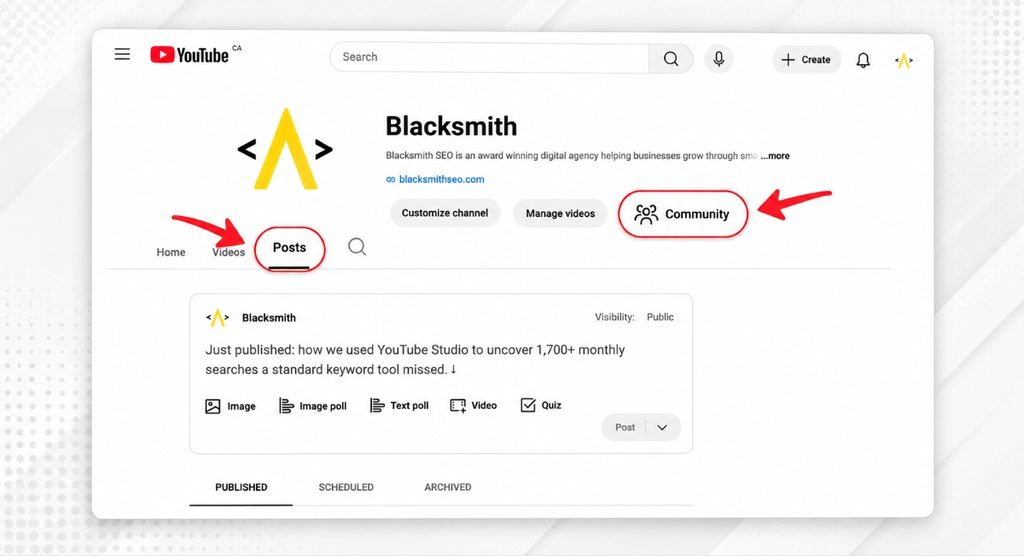
YouTube Posts is YouTube’s built-in social feed on your channel where you can publish text updates, polls, images, GIFs, and video shares that appear directly in your subscribers’ home feeds and Subscriptions tab, not just on your channel page.
YouTube renamed the Community tab to the Posts tab in early 2025. Most people still call it the Community tab — both names refer to the same thing — but Posts is the current name you’ll see inside YouTube Studio. Access requires Advanced Features enabled on your account, no active Community Guidelines strikes, and an audience setting that isn’t Made for Kids. There’s no subscriber threshold to clear, and you can unlock Advanced Features through phone or ID verification, or by building two months of channel history.
One distinction worth knowing: in 2025, YouTube introduced Communities as a separate feature, while the existing Community tab was renamed Posts. When turned on, it creates a sub-section where your subscribers can start their own posts and conversations — separate from your own Posts feed. Your posts appear in both the main Posts tab and the Community space. Subscriber posts only appear in the Community section, keeping your main feed clean. It’s the same tab, just two different layers.
As of 2025–2026, Google has been indexing YouTube Posts in select markets, meaning a well-written post with a clear topic and a link to your video can appear in Google search results alongside the video itself. That’s an additional organic surface — from content you’re already creating.
Why Are Brands with Loyal Audiences the Best Fit for This?
Most brands use YouTube as a broadcast channel — publish a video, wait for views, publish another video. YouTube Posts changes that dynamic, but it only compounds when an audience already has a reason to care between uploads.
That’s why the fit is strongest for businesses where loyalty already exists. A destination travel brand whose guests come back year after year. A local home service company whose customers call them every season. A hospitality brand whose community identity is part of what draws people in. These businesses already have the relationship, and YouTube Posts gives it a home on YouTube.
The broadcast-only model leaves real engagement on the table. Your subscribers opted in — they wanted to hear from you. But if the only time you appear in their feed is when a new video drops, you’re treating a warm audience like a cold one. It’s worth noting that the same principle applies inside your videos too — the way you open and structure content directly affects whether subscribers stay engaged long enough to build that loyalty in the first place. Our guide on how removing friction improves YouTube audience retention covers that side of the equation in detail.
A destination travel brand, for example, has natural content that lives between uploads: a local event worth sharing, a seasonal highlight, a question about what guests want to see next. Publishing a Post there isn’t adding more work — it’s finding a better home for content that probably already exists somewhere.
The same pattern holds across verticals. A local HVAC company can share a quick seasonal maintenance reminder. A SaaS brand can poll users on which feature tutorial to prioritise next. A boutique hospitality brand can share a behind-the-scenes moment from a property renovation. None of these require video production. All of them tell YouTube’s algorithm that your channel is active, engaged, and worth surfacing — even on weeks when no new video goes live.
What Types of YouTube Posts Actually Work for Brands?
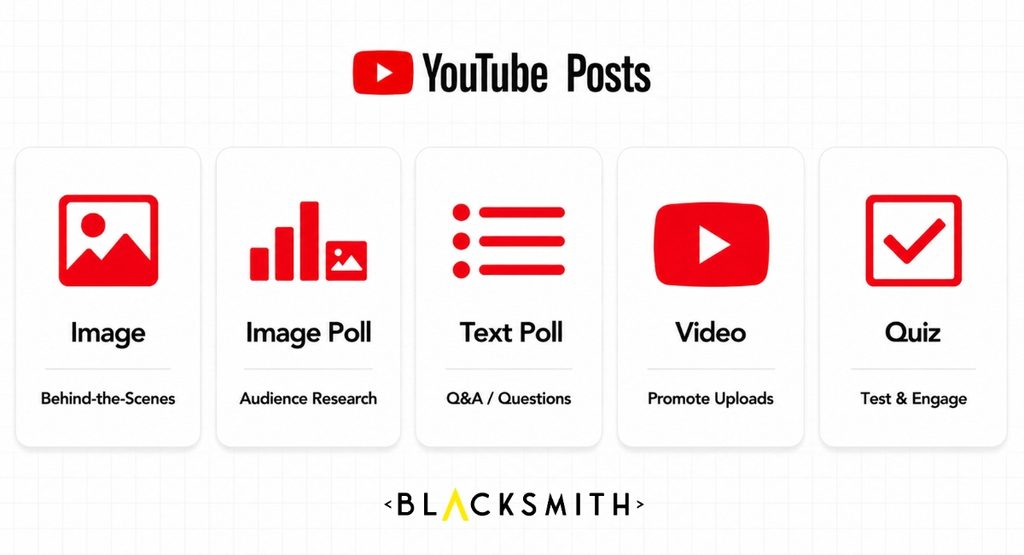
YouTube Posts supports several content formats, and not all of them pull equal engagement — especially for business channels.
Polls
Polls consistently outperform every other post type in raw engagement. According to AIR Media-Tech’s internal data across hundreds of channels, poll engagement runs 3–5x higher than comment rates on standard posts. The reason is friction: voting takes one tap, requires no effort, and gives the viewer an immediate result to react to. For brands, polls do double duty — they engage the audience and give you real data about what they want next.
They’re also a useful upstream signal for video planning — asking your audience which topic to cover next is a form of demand validation that connects directly to your content calendar. If you’re already using YouTube Studio’s Inspiration tab to guide video topic strategy, YouTube Posts polls give you a real-audience layer on top of that process.
A travel brand can ask which destination guide to produce next. A home services company can poll customers on their biggest seasonal concern. A SaaS brand can ask which feature their users rely on most. The answers aren’t just engagement numbers — they’re content briefs.
Video Promotion Posts
When a new video goes live, a YouTube Post announcing it reaches subscribers who may have missed it in their regular feed. This is the highest-value, lowest-effort post type for brands already producing video content. A short caption explaining what the video covers, paired with a direct link, extends the reach of every upload without adding production time. The packaging of that post — how you describe the video — matters for the same reasons your thumbnail and title do. If you haven’t explored YouTube thumbnail and title A/B testing, the same principles around click decisions apply to how you frame a YouTube Post promoting a new upload.
Q&A and Audience Questions
Posting an open question — “What’s the one thing you wish you’d known before your first visit?” or “What would you want us to cover next?” — invites the kind of response that tells you exactly what your audience needs. These posts also signal to YouTube that your channel generates real conversation, which is a positive engagement health signal.
Seasonal and Local Announcements
For businesses with location-based identity or seasonal patterns, YouTube Posts is a natural home for time-sensitive content that doesn’t warrant a full video. An upcoming local event, a seasonal promotion, a local business highlight, a new service or property listing — these pieces of information have real value to a returning audience and zero production overhead.
Behind-the-Scenes Content
A photo from a property, a work-in-progress shot, a quick update from the team — these posts strengthen the personal connection between brand and audience without requiring editing or scripting. They also perform well algorithmically because they encourage comments.
What Does the Data Actually Say About YouTube Posts?
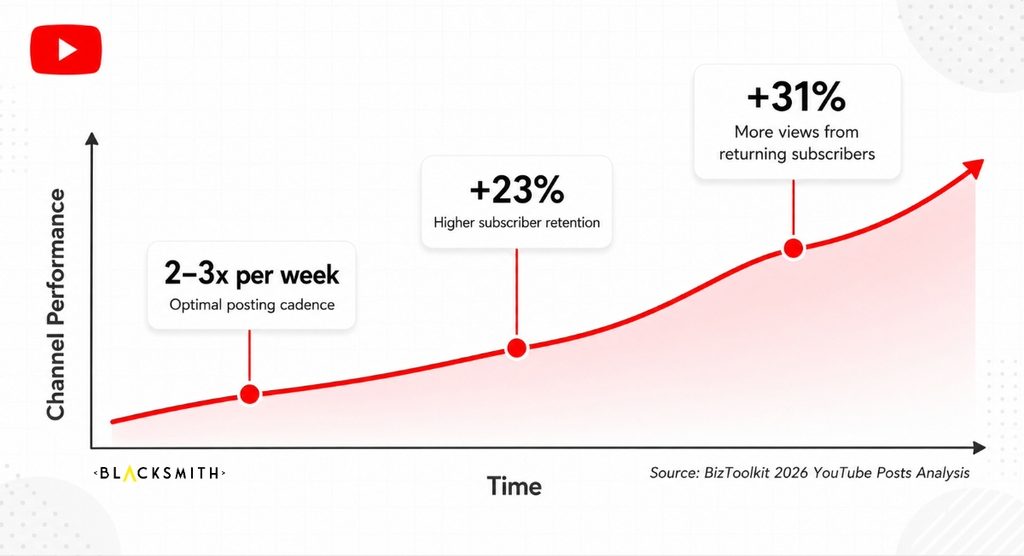
The numbers are clear enough that this feature warrants attention from any brand already investing in YouTube.
According to BizToolkit’s 2026 YouTube Posts analysis, channels that actively use YouTube Posts see 23% higher subscriber retention and 31% more video views from returning subscribers compared to channels that only post videos — a meaningful difference that compounds over time as your video library grows.
The optimal cadence supported by current data is 2–3 posts per week. Gyre’s 2026 guide to the Posts tab confirms that daily posting typically triggers feed fatigue — subscribers start scrolling past — while posting only once a week or less limits the algorithm signal. Two to three well-timed, purposeful posts outperform five rushed ones.
Timing also matters. YouTube Posts have a shorter shelf life in the feed than videos, so posting when your audience is most active is more important than it is for standard uploads. YouTube Analytics shows you when your subscribers are online — use it to schedule posts, not guess.
One feature worth knowing about as your channel grows: YouTube expanded voice replies to all creators in early 2026, allowing channel managers to record up to 30 seconds of audio in response to comments directly from the YouTube app or Studio Mobile. It’s a small addition that adds a personal layer to engagement that typed responses rarely match — particularly useful for brands where the human connection is part of the value.
For a broader look at how video content contributes to visibility across both YouTube and Google, our YouTube SEO guide covers the full picture.
What Does It Actually Take to Make This Work?
YouTube Posts performs when someone is genuinely behind it — posting with a consistent rhythm, responding to comments, and treating the feature as a real channel rather than a content afterthought.
That’s the honest answer, and it’s worth saying clearly: this is not a set-and-forget feature. A Posts tab that goes weeks without activity sends the opposite signal to YouTube’s algorithm — it suggests a channel that’s disengaged, which can reduce video reach over time. Consistency matters more than volume.
The good news is that for most businesses, this fits naturally into an existing workflow rather than creating a new one. If you have a social media team already managing Instagram, Facebook, or LinkedIn, they already understand short-form content, community responses, and posting cadence. YouTube Posts is that same workflow, applied to YouTube — the platform where your video content already lives. It’s an extension, not a new channel to manage from scratch.
What a Simple Internal Workflow Looks Like
A realistic cadence for a business team looks like this:
- Monday: Share a poll related to the week’s content theme or an upcoming video topic
- Wednesday or Thursday: Post a behind-the-scenes update, a seasonal announcement, or a question for the audience
- On upload day: Publish a YouTube Post promoting the new video with a short caption explaining what it covers
That’s two to three posts per week, tied to content that the team is already thinking about. The posts don’t need to be long. They don’t need professional photography. They need to be timely, relevant, and genuine — and they need a response when the audience engages.
How to Know If Your Team Is Ready
A few honest questions worth asking before committing to a YouTube Posts strategy:
- Does someone on your team have time to check and respond to post engagement at least a few times per week?
- Is there a natural source of between-upload content — seasonal updates, local events, promotions, customer questions — that could translate into posts?
- Is there someone with authority to post on behalf of the brand who understands your audience’s tone?
If the answer to those questions is yes, the workflow is already within reach.
How Does YouTube Posts Connect to Your Broader Video Strategy?
YouTube Posts is most powerful when it’s part of a connected content system, not a standalone feature.
Here’s what that connection looks like in practice. When a new video goes live, a YouTube Post extends its reach to subscribers who missed it in their feed — giving each upload a second distribution window at zero production cost. When a poll asks subscribers which topic to cover next, it feeds directly into the video planning process; the audience is doing part of the research for you. And when Posts reference your video content with clear topic language, Google’s indexing of those Posts creates an additional organic surface for the same content cluster.
“At Made on YouTube 2026, YouTube said the Shorts feed will start recommending Posts, with TV support coming, and that over 300 million people engage with Posts every day. That changes how I’d brief them: a post can’t assume the reader already knows your channel, so each one needs a clear topic and a clear next step. Polls still do the most strategic work. They’re first-party demand data, and the answers go straight into the calendar as briefs.”
— Yohana Canon Parra, Content Systems Strategist, Blacksmith
The compounding effect is the point. A video that earns watch time, paired with a blog that earns organic traffic, paired with a YouTube Post that earns engagement and extends reach — these aren’t three separate pieces of content. They’re three surfaces serving the same content investment.
This is the content model Blacksmith builds for clients across verticals — video and written content developed together, connected to the same search strategy from the start. YouTube Posts is the layer your team can own that keeps the audience warm between uploads, extends the reach of every video, and tells YouTube’s algorithm your channel is active and worth surfacing.
(For more on how search and content strategy connect across channels, the Blacksmith Learning Centre covers SEO, AEO, digital strategy, and the fundamentals behind how content earns visibility.)
Is Your YouTube Channel Working as Hard as It Could Be?
The loyalty is already there. Your subscribers opted in, your returning customers keep coming back, and the content your team is producing has real value. YouTube Posts is one of the simplest ways to make more of what you’re already doing — extending reach between uploads, strengthening engagement signals, and giving your audience a reason to stay connected to your channel beyond the next video.
At Blacksmith, we help brands build video and content programmes that are structured to perform — SEO-optimised blogs, retention-focused video scripts, YouTube publishing packages, and the strategy that ties it all together. If you’re investing in video and want to make sure the strategy behind it is built to compound, let’s talk.
Frequently Asked Questions
What are YouTube Posts?
YouTube Posts — formerly called the Community tab — is YouTube’s built-in social feed on your channel where you can publish text updates, polls, images, GIFs, and video shares to your subscribers. YouTube renamed the Community tab to Posts in early 2025. Posts appear in subscribers’ home feeds and Subscriptions tab between video uploads, keeping your channel visible and signalling audience activity to YouTube’s algorithm.
Do you need a certain number of subscribers to use the YouTube Posts?
No. YouTube has removed the subscriber threshold requirement entirely. Any channel with Advanced Features enabled, no active Community Guidelines strikes, and an audience setting that isn’t Made for Kids can publish YouTube Posts — including brand-new channels.
What types of posts work best on YouTube for businesses?
Polls consistently generate the highest engagement of any post type — 3–5x higher than comment rates on standard posts, according to AIR Media-Tech’s data across hundreds of channels. Video promotion Posts, audience questions, behind-the-scenes updates, and seasonal or local announcements all perform well for business channels. The key is variety and consistency rather than relying on one format.
How often should a brand upload Youtube Posts?
Two to three YouTube Posts per week is the cadence supported by current data. Daily posting tends to trigger feed fatigue and reduces per-post engagement. Posting less than once a week limits the algorithm signal the feature is designed to send. Quality and timing — posting when your audience is most active, visible in YouTube Analytics — matters more than volume.
Can YouTube posts appear in Google Search?
Yes, in select markets. As of 2025–2026, Google has been indexing YouTube Posts, meaning a well-written post referencing your video topic with a clear link can appear in Google search results alongside the video itself. This creates an additional organic surface from content your team is already producing.
Is the YouTube Community tab the same as YouTube Posts?
Yes. The Community tab was renamed Posts in early 2025. YouTube also introduced Communities as a separate feature for viewer-to-viewer interaction, so it’s important not to confuse the two. When Communities is enabled, creator posts appear in both the Posts tab and the Community space, while subscriber posts appear only in the Community space.
Does my agency manage YouTube Posts, or does my team?
For most businesses, YouTube Posts works best as a client-owned workflow — managed internally by whoever already handles your social content, since it follows the same short-form, response-based rhythm. At Blacksmith, we build the videos, SEO-optimised blogs, and publishing packages that give your team something worth posting about. The strategy, production, and YouTube publishing are ours. The Posts are yours. That division works well and keeps the content feeling genuine.
