
Quick Summary
Most content teams start with blog keywords and adapt them for video. It works — but it leaves a category of high-value topic undiscovered. YouTube Studio’s Inspiration tab uses your channel’s audience behaviour to surface video ideas that standard keyword research rarely finds. When we applied this process to an active client channel, the suggested topic unlocked a keyword cluster we hadn’t identified anywhere in our written content research. The result: a stronger video topic, a richer blog, and a wider content calendar — without changing the strategy that was already performing.
Do Google and YouTube Actually Reward Different Things?
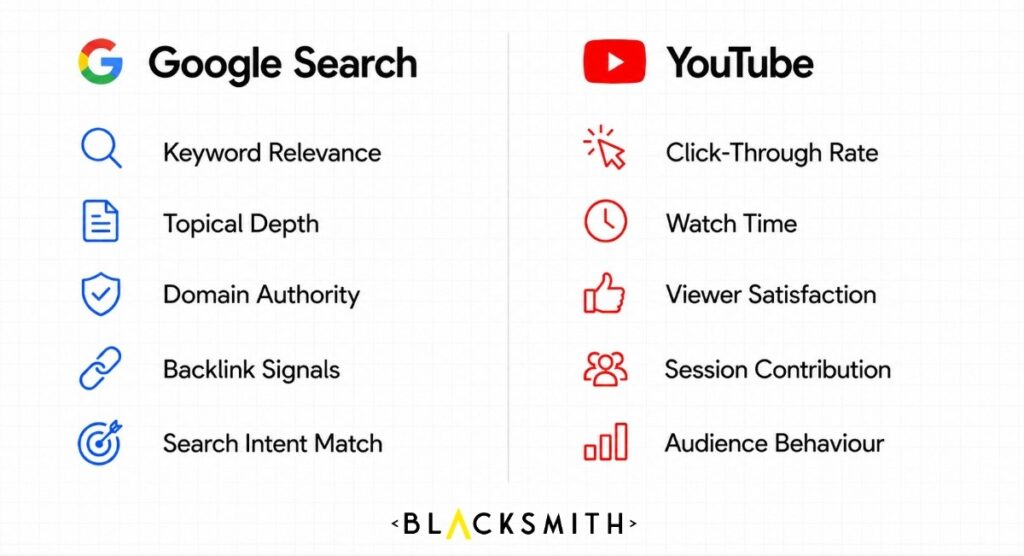
Yes, and understanding that difference is what makes this process worth testing.
Google rewards depth, authority, and relevance. When someone types a query, Google is surfacing the most accurate, comprehensive answer from the most credible source. That’s why written content strategy is built around keyword research, topical coverage, and structured information. The process works because it’s built for the platform.
YouTube works differently. As documented by MarTech, where Google rewards topical depth and authority signals, YouTube focuses on behaviour — what gets clicked, what gets watched, and what keeps people engaged long enough to extend the session. A topic that earns strong organic rankings in Google may generate almost no traction on YouTube, not because the content is poor, but because the audiences and their expectations are completely different.
This is the gap most content teams aren’t accounting for. You can do everything right — keyword research, SEO-optimised titles, solid production — and still find that your YouTube channel underperforms relative to your blog. Often the issue isn’t execution. It’s that the topic was chosen for the wrong platform’s discovery signals.
What Is YouTube Studio’s Inspiration Tab, and How Does It Work?
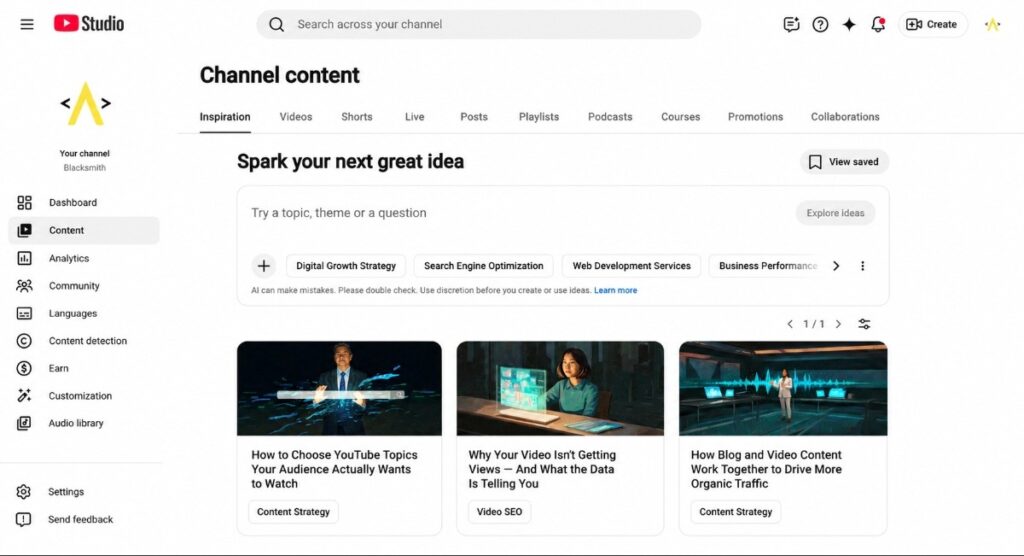
The Inspiration tab is YouTube Studio’s AI-powered content ideation feature — and it’s worth understanding exactly what it does before building a workflow around it.
YouTube introduced the tab by renaming and rebuilding what was previously called the Research tab, adding generative AI capabilities to what had been a simpler search-gap tool — a shift the platform detailed in its 2025 Youtube Studio Updates. Today, the Inspiration tab generates video topic ideas based on your channel’s content history, your audience’s behaviour, and trending signals in your niche.
According to YouTube’s own documentation, the feature “explains why it’s making specific suggestions based on audience insights and behaviour” — which is what makes it meaningfully different from a generic topic generator. When you open the tab, you’ll see a set of suggested topics tailored to your specific channel. For each idea, YouTube provides a potential title, a brief description, a thumbnail concept, and an estimated audience interest level. Click into any suggestion and it generates an outline, alternative titles, and additional angles. You can also enter your own prompt and have the AI build around it.
One thing worth knowing before you rely on it: YouTube’s documentation includes a clear caveat that “AI-generated content ideas using the Inspiration tab may be inaccurate or inappropriate and vary in quality.” That matters. The Inspiration tab is a discovery tool, not a content brief. Every suggestion needs to be evaluated against your channel’s strategy, validated with keyword research, and shaped by your own expertise before production. Used that way, it’s one of the most underused tools in YouTube Studio.
What Does the Video-First Discovery Process Actually Look Like?
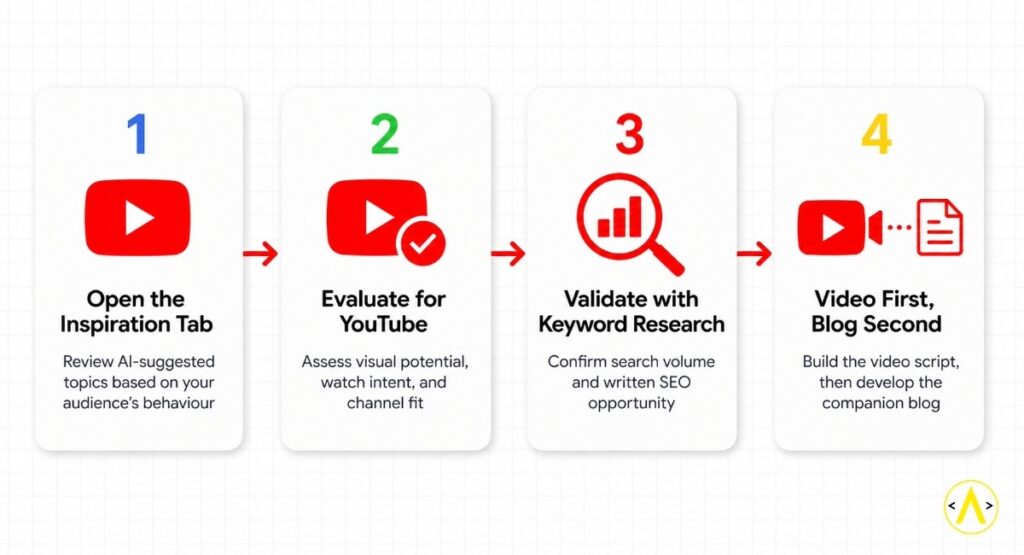
Here’s the process we’ve been testing across client channels — and what it uncovered when we applied it.
Step 1. Open the Inspiration Tab Without an Agenda
Go into YouTube Studio and navigate to the Content section. The Inspiration tab lives there. Open it before your standard keyword research session — not to validate an idea you’ve already decided on, but to see what YouTube’s AI is suggesting based on your audience’s actual behaviour. Review the initial suggestions. Look for topics that feel slightly unexpected: ideas that sit adjacent to your usual content pillars but that your audience’s behaviour is apparently pulling toward.
Step 2. Evaluate the Suggestion on YouTube Terms First
Before you run any keyword research, ask whether the topic makes sense for video. Does it have visual or experiential potential? Would someone search for it on YouTube specifically, rather than Google? Is there a clear hook — something that rewards watching rather than reading? If yes, move forward. If it feels purely informational, it may be better suited to a blog-first approach.
Step 3. Run It Through Standard Keyword Research
This is where the process gets interesting. Take the suggested topic into your keyword research tools and map the search volume of the topic and related terms. What we’ve found is that YouTube-native topics sit inside keyword clusters that written content research doesn’t surface — not because the volume isn’t there, but because the blog-first process starts from a different angle. The demand is real. It simply wasn’t visible from the keyword-first entry point.
Step 4. Build the Video First, Then the Blog
If the topic holds up on both counts — strong video potential and a validated keyword cluster — produce the video first. Script it for a YouTube-native audience: hook-led, structured for watch time and session contribution, built around what viewers will actually watch. Then write the blog to match. The blog can go deeper, cover the informational angles Google rewards, and embed the video for dwell time and EEAT signals. Both pieces are stronger because the topic was chosen for both platforms from the start.
(For more on building videos that hold attention once the click happens, our piece on How Removing Friction Improves YouTube Audience Retention covers the production side of this in detail.)
What Did the Inspiration Tab Process Look Like in Practice?
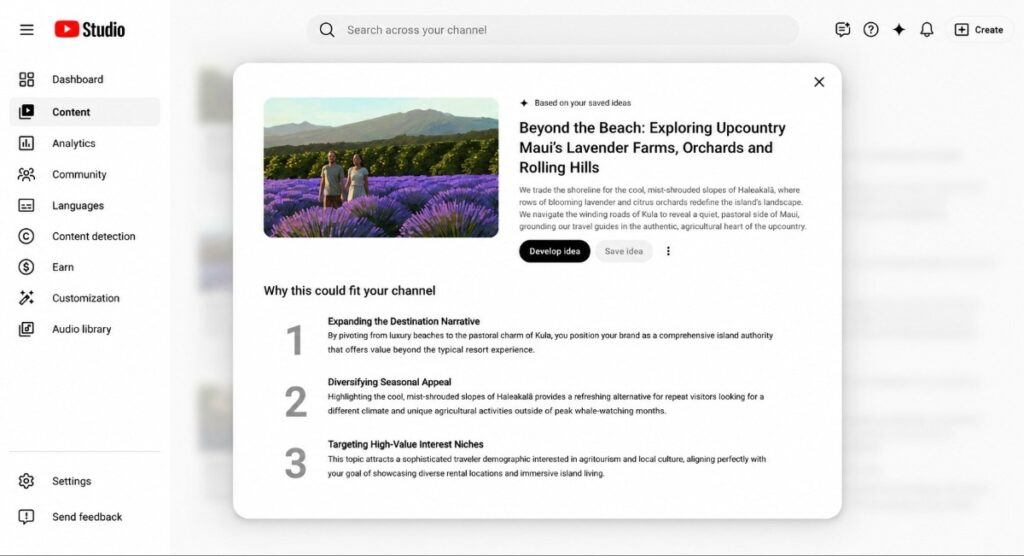
We applied this process to an active travel client channel — a vacation rental brand with properties across Maui. The channel’s existing content was solid: destination guides, property showcases, local experience videos. All of it built on a blog-first workflow that had been producing consistent results.
When we opened the Inspiration tab for that channel, one suggestion stood out immediately:
“Beyond the Beach: Exploring Upcountry Maui’s Lavender Farms, Orchards and Rolling Hills. We trade the shoreline for the cool, mist-shrouded slopes of Haleakalā, where rows of blooming lavender and citrus orchards redefine the island’s landscape. We navigate the winding roads of Kula to reveal a quiet, pastoral side of Maui, grounding our travel guides in the authentic, agricultural heart of the upcountry.”
YouTube’s rationale for the suggestion was specific. It noted the topic would expand the destination narrative beyond luxury beaches, diversify seasonal appeal by highlighting the cooler Haleakalā slopes as an alternative outside peak whale-watching months, and target a sophisticated traveller demographic interested in agritourism and local culture — “aligning perfectly with your goal of showcasing diverse rental locations and immersive island living.”
That wasn’t a topic we would have found starting from written keyword research. Upcountry Maui doesn’t surface as a high-volume destination keyword through standard tools. But when we ran it through keyword research, the related cluster — upcountry Maui, Maui upcountry, Maui lavender farm, and things to do in Kula — carried over 1,700 combined monthly searches in the US alone, across terms with keyword difficulty scores of 0–1. The audience was there. We just hadn’t been looking in the right place.
We built the video around that topic and scripted for YouTube-native engagement. The blog followed, built around the keyword cluster the Inspiration tab helped us find. As of publication, the video and blog are still within their initial attribution window — we’re tracking impressions, watch time, and organic performance for both assets and will report the full results once we have a complete 60–90 day window. The point stands regardless of the eventual numbers: the topic existed, the demand was real, and the standard keyword-first workflow wasn’t surfacing it.
Does Video-First Discovery Replace the Blog-First Approach?
No — and it’s worth being direct about that.
The blog-first content model works. Building written content around high-volume keywords, optimising for Google and AI search, then adapting those pieces into video is a sound strategy — and it’s the foundation of how most content programmes operate, including ours. The process produces results precisely because it starts from validated demand on a platform we understand well.
What the Inspiration tab adds is a parallel discovery layer. Not a replacement. Think of it as widening the aperture on your research: the blog-first model reveals what Google users are searching for; the Inspiration tab reveals what your YouTube audience is already being guided toward by the platform’s own behaviour signals. Those are two different data sets. Both matter.
When you run both processes together, something else becomes clear. The topics that surface through the Inspiration tab often strengthen your written content calendar too — because they unlock keyword clusters that were real and searchable but simply invisible from the keyword-first starting point. You end up with more content opportunities, not a different set of them.
The compounding effect is what makes this worth integrating. A video built on a YouTube-native topic, embedded in a blog built on the keyword cluster that topic revealed, creates a piece of content that works across both platforms simultaneously — stronger watch time signals on YouTube, stronger dwell time and EEAT signals on the blog, and a wider surface area for organic discovery across both Google and YouTube Search.
That advantage matters even more heading into the back half of 2026. Google’s AI Overviews and YouTube’s own Ask YouTube feature now pull directly from video content — surfacing transcripts and structured video data inside AI-generated results rather than only linking out to them. A video-first topic that’s properly structured (a clear transcript, VideoObject schema on the page it’s embedded on, and a direct answer to the query in the first minute) has a real shot at appearing inside an AI Overview the same way a well-optimised blog post does. Skipping the video-first discovery step doesn’t just mean missing a YouTube-only audience anymore — it means leaving a second AI-search surface unclaimed. For the full mechanics of this, see our guide on how to rank videos and win AI Overviews.
(If you’re thinking about how video and written SEO interact more broadly, our YouTube SEO guide covers how the two channels support each other.)
When Should You Start With Video Discovery vs. Blog Keywords?
Both, where capacity allows. But if you’re deciding where to begin on a specific content piece, this framework helps:
| Start With the Inspiration Tab | Start With Blog Keywords |
| Topic has clear visual or experiential potential | Topic is primarily informational or instructional |
| Channel has established audience history in YouTube Studio | Channel is new with limited audience data |
| Topic feels saturated in written search — YouTube may offer a fresh angle | Campaign is tied to a specific organic search term |
| You want to surface topics your competitors aren’t targeting yet | Written content calendar has a clear gap to fill |
The Inspiration tab becomes more powerful as your channel matures. Suggestions are drawn from your audience’s actual behaviour — so a newer channel with limited data will see more generic ideas, while an established channel with consistent content and a defined audience will get suggestions that are more specific and more actionable.
How Do You Add the Inspiration Tab Process to Your Existing Workflow?
This doesn’t require rebuilding your content process. It requires adding one step upstream.
Once a month — or once per content planning cycle — open the Inspiration tab for each client channel and review the suggestions before your standard keyword research session. Note anything unexpected. Look for topics that sit adjacent to your core content pillars but feel YouTube-native. Run the promising ones through your keyword tools to validate demand.
If a topic surfaces with both strong video potential and a real keyword cluster attached, slot it into the calendar as a video-first piece. Everything else continues through your normal blog-first workflow.
A practical monthly cadence looks like this:
- Review: Open the Inspiration tab for each active client channel and document the suggestions
- Filter: Evaluate each idea against YouTube terms first — visual potential, watch intent, channel fit
- Validate: Run shortlisted topics through keyword research to confirm written SEO opportunity
- Produce: Build the video script first, then develop the blog around the keyword cluster
- Track: Monitor both assets as a paired set — video performance (impressions, CTR, watch time) alongside blog performance (organic traffic, dwell time, rankings)
The data from both assets becomes your feedback loop. Over time, you’ll develop a clear picture of which topic categories the Inspiration tab consistently surfaces that your keyword tools were missing — and that pattern is where your next content pillar often begins. For a deeper grounding in how search and content strategy connect, the Blacksmith Learning Centre is a good place to continue.
Ready to Make Video Work Harder for Your Brand?
Most content teams are sitting on a discovery tool they’ve never fully used — and the topics it surfaces are often the ones their audience is already looking for. The gap between what a channel publishes and what YouTube is trying to recommend is smaller than it looks. It just takes the right process to close it.
At Blacksmith, video and written content are never built in isolation — they’re developed together, connected to the same search strategy from the start. If you’re ready to build a content programme that works across both platforms, explore Blacksmith video marketing services today.
Frequently Asked Questions
What is YouTube Studio’s Inspiration tab?
The Inspiration tab is an AI-powered content ideation feature inside YouTube Studio. It generates video topic suggestions, potential titles, thumbnail concepts, outlines, and audience interest estimates based on your channel’s content history and audience behaviour. YouTube introduced the feature by rebuilding what was previously called the Research tab in June 2024, adding generative AI to what had been a simpler search-gap tool.
How is YouTube topic research different from Google keyword research?
Google keyword research identifies what people are actively searching for in text-based queries. YouTube topic research — through the Inspiration tab — draws on behavioural signals: what your specific audience watches, engages with, and responds to on the platform. The two surfaces reward different formats and surface different topic opportunities. Using both gives you a wider, more complete picture of where demand actually exists.
Can a YouTube-inspired topic also rank in Google Search?
Yes, and frequently with meaningful search volume attached. YouTube-native topics often sit inside keyword clusters that carry real organic demand in Google Search. The key is validating the topic through keyword research after identifying it through the Inspiration tab, then building both a video and a companion blog that targets the written SEO opportunity. Embedding the video in the blog also strengthens EEAT and dwell time signals for Google.
Do I need to change my existing content strategy to use the Video-First approach?
No. The Inspiration tab process adds an upstream discovery layer to your existing workflow — it doesn’t replace keyword-led blog strategy. The two approaches surface different categories of topic and work best when run in parallel. The result is more content opportunities, not a different content strategy.
How accurate are YouTube Studio’s Inspiration tab suggestions?
YouTube’s own documentation notes that “AI-generated content ideas using the Inspiration tab may be inaccurate or inappropriate and vary in quality.” Treat every suggestion as a starting point, not a finished brief. Each idea should be evaluated for channel fit, validated with keyword research, and refined with your expertise before production.
Does the Inspiration tab work better for established channels?
Yes. Because the feature draws on your channel’s audience behaviour data, suggestions become more specific and actionable as your channel matures. Newer channels with limited data will see more generic ideas. Channels with consistent content and a defined audience will receive more targeted, relevant suggestions.
Is the Video-First approach only useful for travel or lifestyle content?
No. We’ve observed this across multiple client verticals — travel, home services, vacation rentals, and SaaS. The Inspiration tab pulls from your channel’s specific audience data, not from a generic topic pool, so the suggestions reflect what your particular viewers are responding to. The process of validating those suggestions with keyword research applies regardless of industry.
